Setting up SSH Access
While Web SSH provides a convenient, browser-based solution for many services, we also support Direct SSH access for technical workflows that require local terminal environments.
Active Sessions:
If you currently have sessions running, Direct SSH access (via PuTTY, Termius, etc.) will only become available after you have completed the configuration and restarted your session.
Prerequisites: Set Up Your Public Key
Security for Direct SSH access is managed via Public Key Authentication. You must have an SSH key pair to proceed.
If you already have a public key: Skip down to the Add Public Keysection.
If you need to create one: Follow the guide below to generate your key pair.
Generating a public key
We recommend using MobaXterm for Windows users as it provides an all-in-one toolkit for SSH management.
- Download & Install: Visit the official MobaXterm websiteto download and install the Home or Professional edition.
- Launch KeyGen: Open MobaXterm, navigate to the Tools menu, and select MobaKeyGen (SSH key generator).
- Generate: Click the Generate button and move your mouse over the blank area to create entropy for the key.

Saving Your Keys
- Public Key: Copy the text from the box labeled "Public key for pasting into OpenSSH authorized_keys file". You will need this to access CPU/GPU services in the OctaSpace marketplace.
- Private Key: Click Save private key to store your .ppk file safely. Do not share this file with anyone.
On Windows, SSH keys are typically stored in:
C:\Users\%USERNAME%\.ssh
Add public key to Cube
To enable Direct SSH across your services, you must link your public key to your OctaSpace profile.
- Log In: Navigate to the Cube Dashboard and sign in to your account.
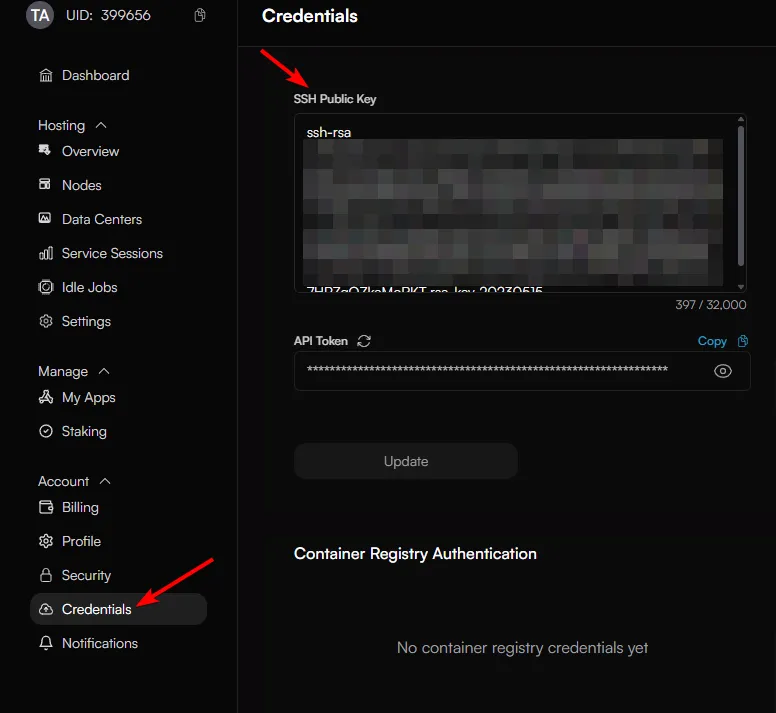
- Access Credentials: Select Credentials from the main sidebar menu.
- Paste Your Key: Locate the SSH Public Key field. Paste the public key you generated in the previous step (it should start with ssh-rsa or ssh-ed25519).
- Save: Click the Add Credential button to finalize the setup.
Ensure you copy the entire key string from MobaKeyGen. If the key is truncated, your SSH connection will be rejected.
Once you have your key configured, jump to Accessing via Direct SSHAccessing via Direct SSH section.